×
Howto use the fermentation simulator
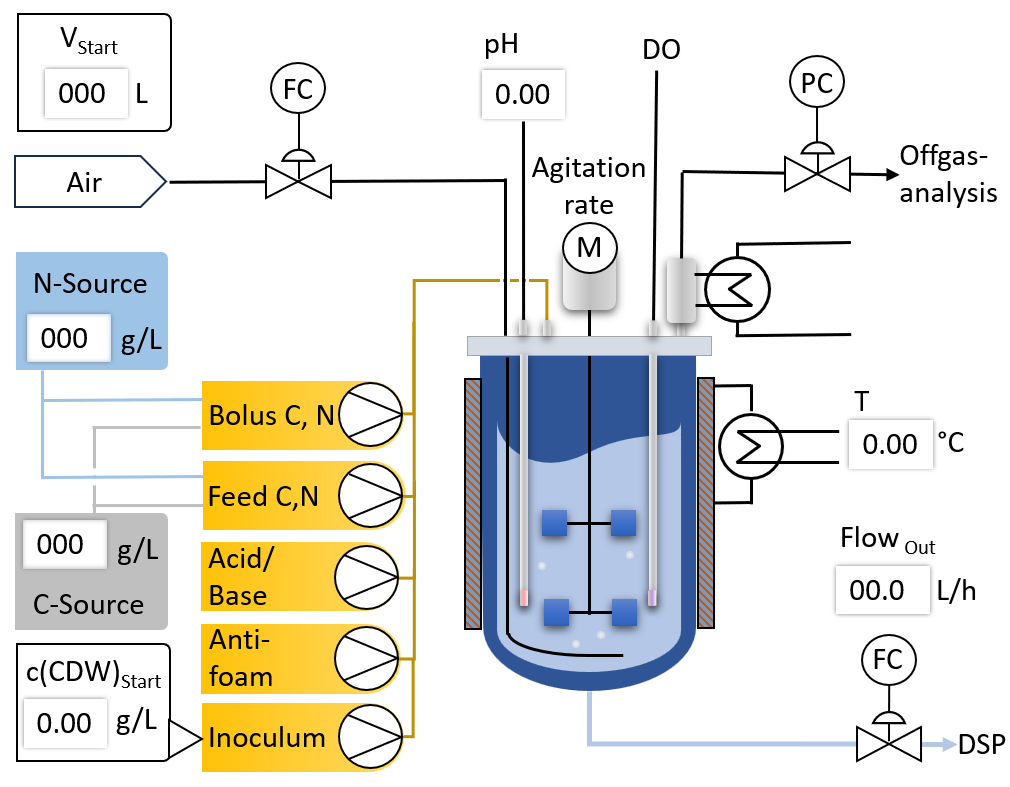
Imagine you are in a fermentation lab. There is a fermenter in which you want to run an experiment with the model and organism you select via the Model drop down menu.
The experiment uses a fully equipped fermenter (chart in the upper left) for which you can set the following parameters in the depiction:
VStart
The starting volume (with incolum, withou addition of Carbon and Nitrogen source
pH
the pH of the fermentation
T
the temperature of the fermentation
N-Source
the concentration of the Nitrogen source in a feeding bottle from which this solution can be added to the fermentation (e.g. Ammoniumsulfate solution)
C-Source
the concentration of the Carbon source in a feeding bottle from which this solution can be added to the fermentation (e.g. Glucose solution)
c(CDW)
the concentration of biomass in the fermenter at the start of the fermentation, given as cell dry weight (CDW)
Flowout
in case you want to run a continuous fermentation, you can set a rate at which fermentation broth is removed from the fermentation vessel
The remaining parameters are set in the table to the right. Here the fermentation is divided into phases, so that you can realize step changes in your experiment like
increasing aeration rate, feeding rate etc. You can use up to 10 phases. In case you do not need a phase, set its duration to 0.
Parameters in the table:
Phase
Number of the phase
Start
Start time of the phase in elpased fermentation hours
Duration
Duratioon of the phase in hours
Aeration
Aeration rate in norm Liters per hour
pressure
fermentation vessel pressure in barg
agitation
agitation rate in rpm
Feed.C/N
Feeding rate for Carbon/Nitrogen source in liters per hour
Bolus.C/N
Volume of C/N-source added as a pulse at the start of the phase
Once your experiment is fully parameterized click the Calculate Button and wait for the fermentation to finish.
Results are shown in 4 graphs:
- concentration of Substrates (C, N - Source)
- concentration of Products (Biomass and product) plus Volume
- parameters linked to oxygen transfer (rpm, DO, aeration + agitation rate)
- offgas analytics (OUR, RQ)
You can also download the data into an excel file for further processing, sharing or educative puproses